 Voxyrn
Google Voice outbound dialer
Selenium drives voice.google.com in a persistent browser profile. Linux servers use Chromium. Windows keeps Google Chrome.
Self-hosted sales automation
Voxyrn is a self-hosted AI auto dialer and carrier CRM for outbound Google Voice campaigns. It dials in the browser, talks with a voice agent, detects voicemail, records the call, and files the lead.

Voxyrn is a self-hosted AI auto dialer and carrier CRM. Selenium places outbound calls through the operator's own Google Voice account. On Linux the browser is Chromium. On Windows it is Google Chrome. A voice agent listens and answers on the connected call. The same run can write the call log, the recording, the transcript, the lead, and the carrier profile. Speech can stay on the machine with Piper or Kokoro, faster-whisper, and a local GGUF model, or it can use Groq when an API key is configured.
Selenium drives voice.google.com in a persistent browser profile. Linux servers use Chromium. Windows keeps Google Chrome.
Ringing, connected, ended, failed, and voicemail only move after minimum ring time and repeated checks of the Google Voice page.
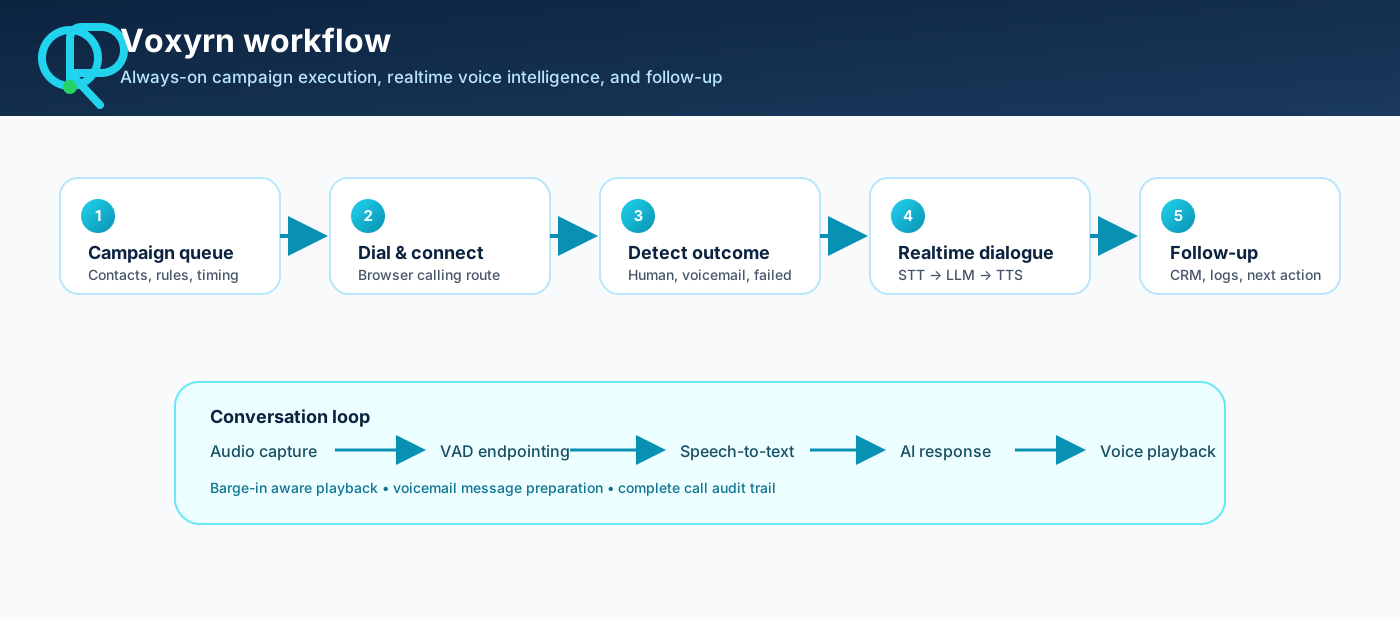
The live loop uses voice activity detection, faster-whisper (CPU int8) or Groq speech-to-text, a local GGUF model or Groq for the reply, and Kokoro, Piper, or Edge text-to-speech.
A beep, mailbox wording, or a saved greeting fingerprint can mark an answering machine. A prepared voicemail can be played. A short human hello is not treated as a mailbox by itself.
Each attempt can write a call log, a connected-call row, a transcript, and a WAV recording of both sides.
The lead row stores interest, callback time, and follow-up status. The list exports to CSV.
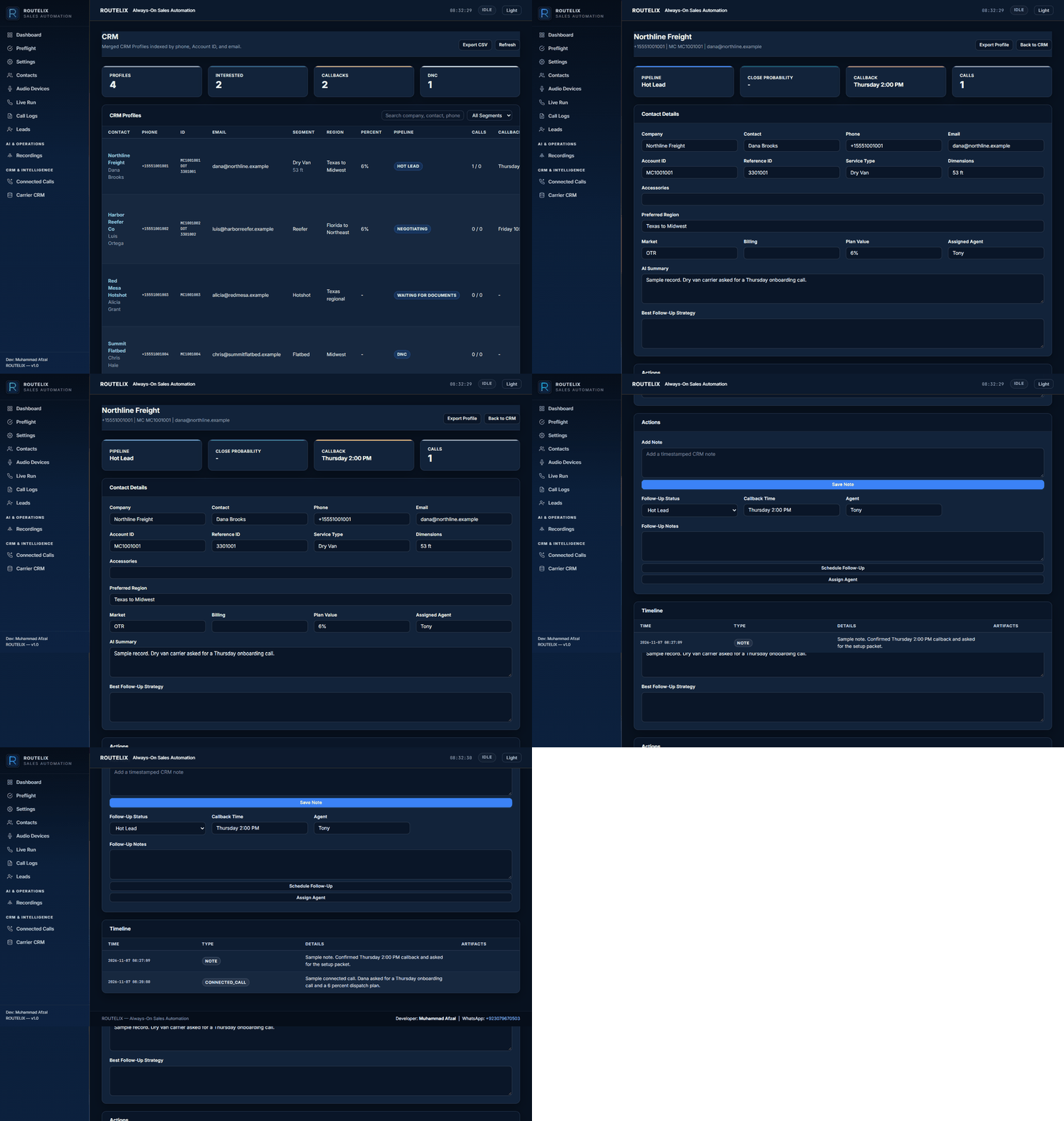
Carrier profiles keep company, phone, MC, DOT, truck type, lanes, notes, follow-up, and the assigned dispatcher, with CSV and JSON export.
Contacts import from a workbook or CSV (MC, legal name, states, address, phone, email). Preflight checks the environment before a live run.
The console requires a signed-in user. An admin creates operator accounts. Passwords are hashed. Sessions use a signed cookie and a CSRF token.
A dispatcher loads carriers, and the agent qualifies equipment and lanes on the connected call. The CRM keeps MC, DOT, truck type, lanes, notes, and the next follow-up.
A team runs an outbound list from one Google Voice number, reviews call logs and recordings, and works the leads that asked for a callback.
An agency can host the console for a campaign, give each operator a login, and keep the speech models on the server when Groq is left off.
An administrator creates the operator login. The steps below are the live-run path in the console.
These are screenshots of the Voxyrn console: preflight, the live run, contacts, leads, recordings, and the carrier CRM.


Voxyrn is a self-hosted AI auto dialer and carrier CRM for outbound Google Voice campaigns. It dials from Chromium or Chrome, talks with a voice agent, detects voicemail, records the call, and files the lead.
No. The phone line is the operator's Google Voice account in the browser. Twilio, Asterisk, and FreeSWITCH are not part of the dial path.
Yes. Piper or Kokoro speaks, faster-whisper transcribes on CPU with int8, and a local GGUF model can write the reply. Groq is used only when a key is set and the speech or answer backend is switched to Groq.
Voxyrn creates two PulseAudio or PipeWire null sinks. Text-to-speech plays into the sink Chromium uses as its microphone, and speech-to-text records the sink Chromium uses as its speaker. A headless server has no room speakers; listen in the Recordings tab. The virtual route can fail if Chromium does not attach to those devices, so the audio test in the console should be run before a live campaign.
No. The first sign-in is manual. Use the localhost noVNC session or copy a Chromium profile that is already signed in. A cookie file is only a best-effort import and Google often rejects it. Headless Chromium cannot finish a Google challenge or two-factor prompt.
On a connected outbound call, the agent listens and answers. It does not run a separate inbound queue. Callback times are stored on the lead and the carrier profile.
INDUS Web Agency hosts this installation at voxyrn.induswebagency.com. Operator accounts are created by an admin. There is no public self-serve signup.
If you already have an operator account, log in. An administrator creates users from the console. To host Voxyrn for a campaign, contact INDUS Web Agency.